Multi-pages website

"Enthusiastic QA Analyst with a profound interest in backend development, driven by a passion for creating robust and reliable software systems. Committed to continuous learning and exploration of backend technologies, I find joy in unraveling complexities and optimizing performance. Beyond the code, I am dedicated to mentoring kids, sharing my knowledge, and igniting their curiosity for technology. Through insightful blog posts, I aim to inspire others while fostering a supportive community of learners. Join me on this journey as we explore the world of backend development and empower the next generation of tech enthusiasts!"
"Okay, let's imagine you're making a book about your favorite adventures! Each page of your book is like a different adventure story, right? Well, a multi-web pages website is kind of like your adventure book, but on the computer!

In HTML, we use different pages to tell different parts of our story, just like different chapters in your book. Each page has its own special story to tell, and we use links to move from one page to another, just like turning the pages of your book!
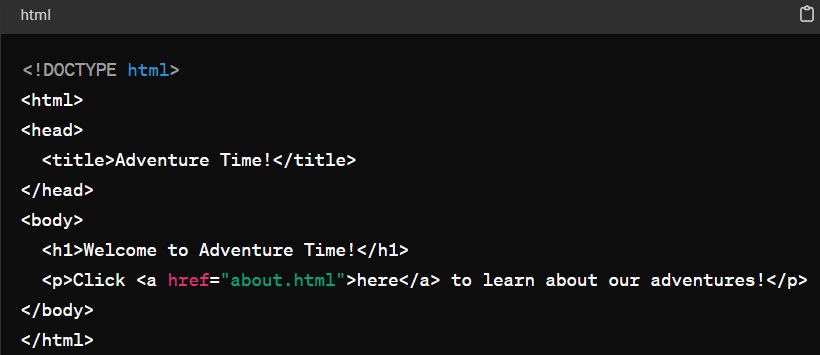
Here's an example of what our adventure website might look like in HTML:
index.html (Homepage):
about.html (About Page):
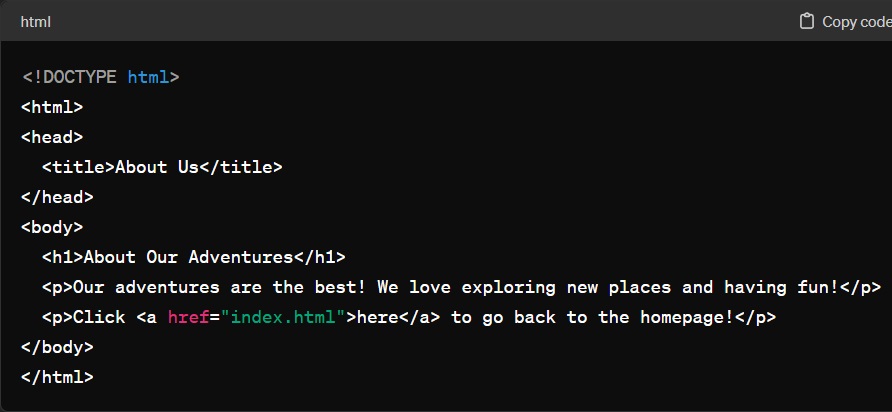
See how we have different pages, like index.html for the homepage and about.html for the about page? And we use links (the <a> tag) to move between the pages, just like turning the pages of your adventure book!
So, a multi-web pages website is like a collection of different adventure stories on the computer, with each page having its own special story to tell!"